 Off Duty Ninja
Take care of your people. They'll take care of you.
Off Duty Ninja for Work makes it easy for your people to use the time off they've earned. Our rules engine reads your leave policy alongside the law where your people work, including paid sick leave, and shows every hour before it's lost.
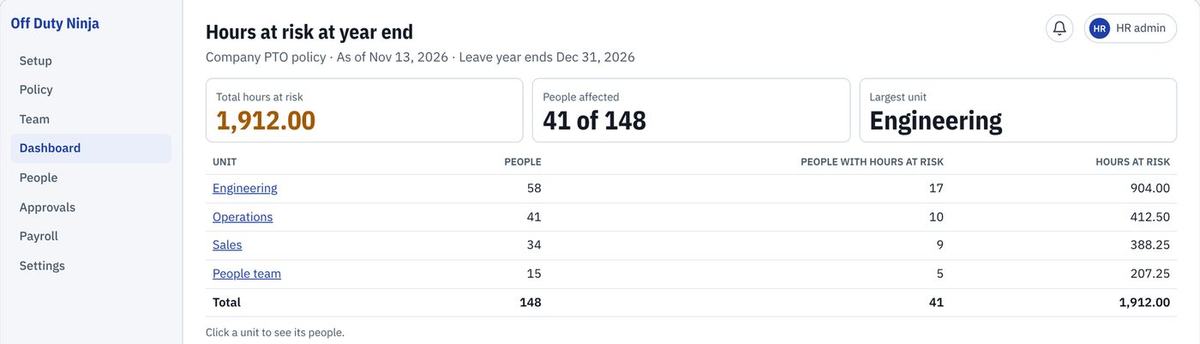
One rules engine. All 50 states researched.
Your policy is only as good as the law behind it. The engine reads both, rule by rule, and tells you where they meet and where they may not.
Your policy, rule by rule
Earning, carryover, caps, cash-out and payout, each tied to the section of your policy it came from.
Federal and state law
Use-it-or-lose-it, caps, payout at separation and paid sick leave. We've researched all 50 states from their official sources and are adding them to the engine state by state.
Where you may not comply
When a rule in your policy may conflict with the law where your people work, we flag it and show the source. Your counsel decides.
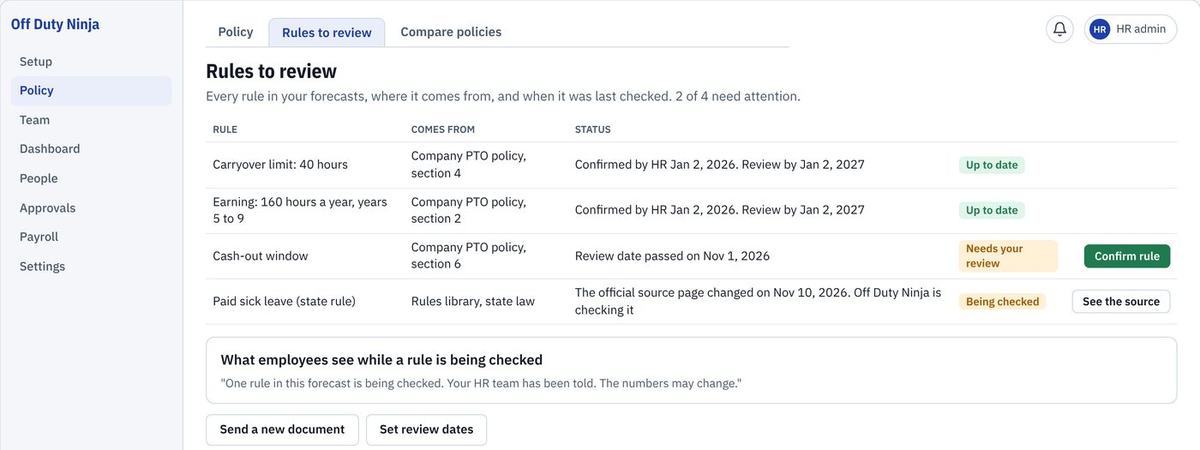
Every number shows its math.
Hours come from your own policy rules, with the section each one used. Nobody has to trust a guess.
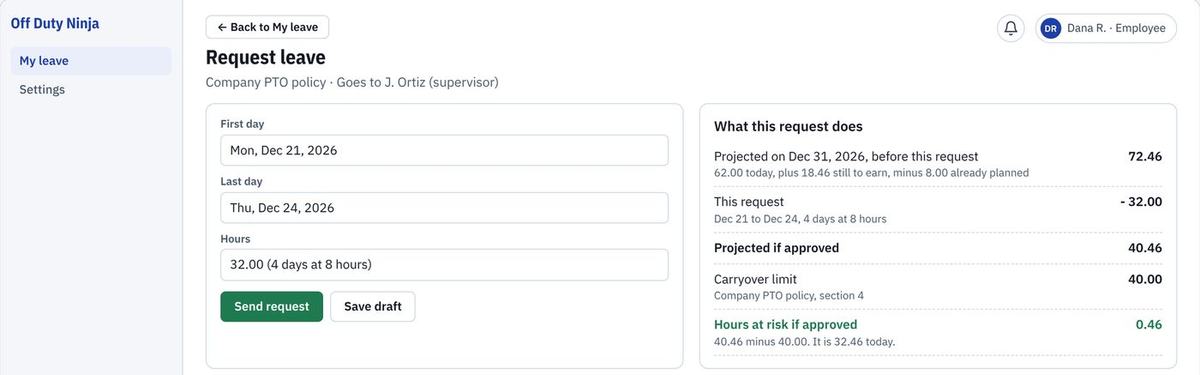
Employees can see the effect of the time off request in real-time.
Before they send it, each person sees what the time off does to their balance and how many hours they would still lose at year end.
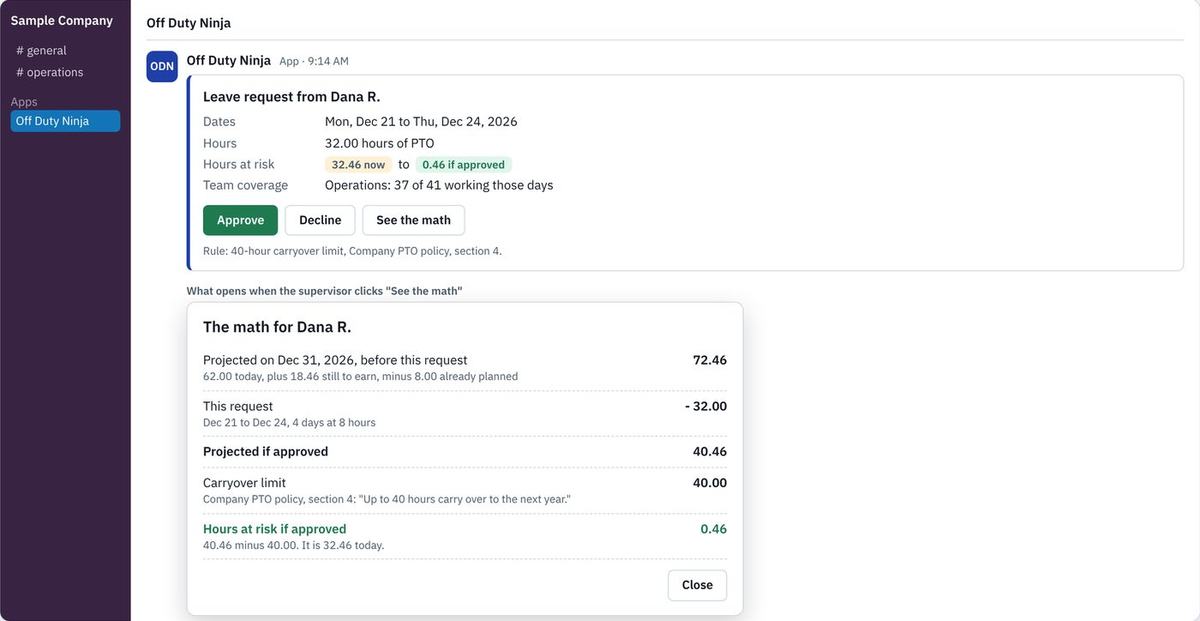
Approve in Slack, where they already work.
The request arrives with team coverage and hours at risk. One click opens the math behind it.
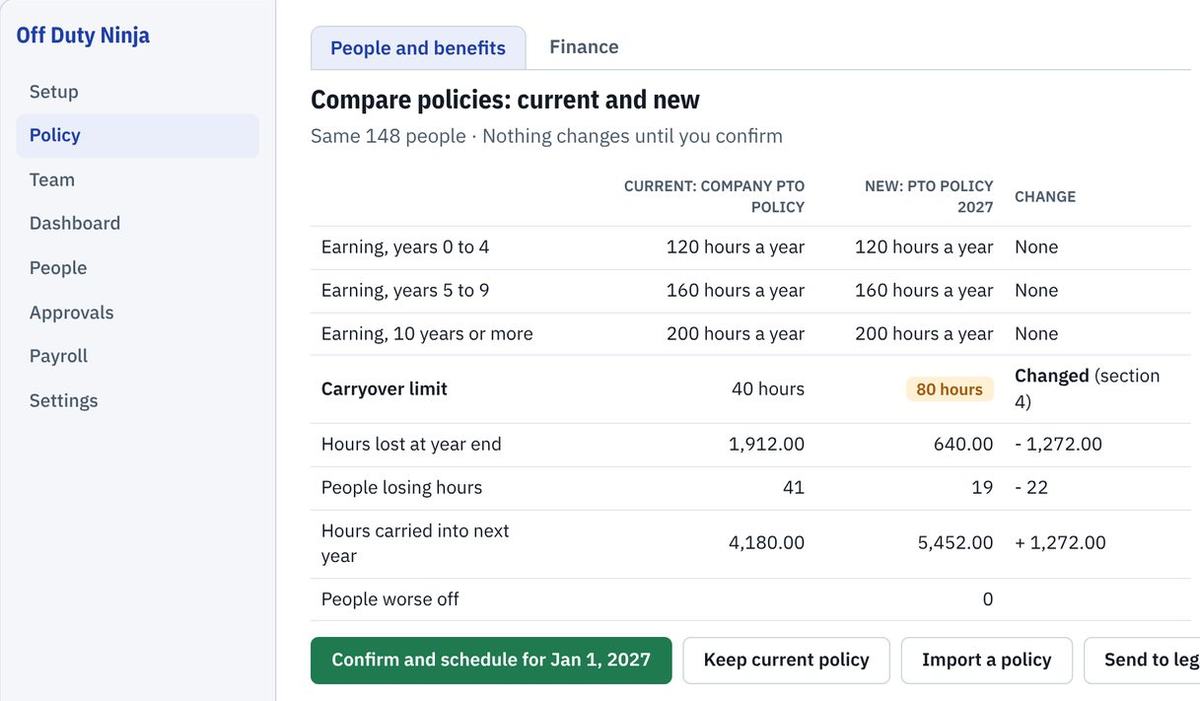
Test a policy change before anyone feels it.
Put your current and new policy side by side and see hours lost, people affected and anyone left worse off. Nothing changes until you confirm.
Running in three steps
On Basic you set it up yourself. On Team and Enterprise we set it up with you. Your people keep working where they already do.
Send your staff list
A spreadsheet is enough. Connecting your HR system is optional on Team.
Set your policy
We load your leave policy with you and check the hours against your own records.
People request, supervisors approve
Employees request. Supervisors approve in Slack. HR sees the whole company.
Three plans. Pick by how you work.
Start small on Basic. Move to Team when you need your own policy, Slack approvals and payroll. Enterprise adds what larger organizations need.
Basic
So simple you turn it on and set it up yourself. No help from us needed.
- Turn it on and set it up yourself
- Pick a policy from our library
- Load your team
- Hours-at-risk dashboard
- Each person's math, line by line
- Employee view and requests
Team
Everything in Basic, set up around your own policy and tools.
- Import, check and compare your own policy
- Slack approvals and reminders
- Approvals with more than one step
- Payroll file sent automatically
- Roles and a full activity log
- Sign in with your company account
Enterprise
Everything in Team, plus the controls a larger organization needs.
- Everything in Team
- Reconcile leave with payroll
- Accounts that follow your company directory
- Full company sign-in controls
- Forecasts by your own structure: units, cost centers, locations
Founding customers
Our first three Team customers get a much lower setup fee and a discount for their first 12 months, in return for feedback and a case study we write together. Open to employers of up to 500 people. Ask about it when you request your preview.
Add-ons we're exploring
Tell us which would help you most when you request your preview.
- Running payroll for you, through a partner
- Time and attendance
- Employee onboarding
Compare every feature
| Feature | Basic | Team | Enterprise |
|---|---|---|---|
| People | Up to 10 | Any size | Any size |
| Policy from our library | Yes | Yes | Yes |
| Your own policy, imported and checked | No | Yes | Yes |
| Compare a current and new policy | No | Yes | Yes |
| Hours-at-risk dashboard | Yes | Yes | Yes |
| Each person's math | Yes | Yes | Yes |
| Employee view with the effect shown first | Yes | Yes | Yes |
| "Take the time" suggestions | Yes | Yes | Yes |
| Slack approvals and reminders | No | Yes | Yes |
| Approvals with more than one step | No | Yes | Yes |
| Payroll file sent automatically | No | Yes | Yes |
| Roles and activity log | No | Yes | Yes |
| Donate and cash out leave, where policy and law allow | No | Yes | Yes |
| Sign in with Microsoft, Google or Slack | No | Yes | Yes |
| Connect your HR system | No | Optional | Yes |
| Reconcile leave with payroll | No | No | Yes |
| Accounts that follow your company directory | No | No | Yes |
| Full company sign-in controls | No | No | Yes |
| Forecasts by your own structure | No | No | Yes |
Built for people's data
Leave records are personal. Your people trusted you with them, and we keep them that way. Here is exactly how, in terms your security team will recognize.
Each employer's data kept apart
Every record carries its company in every key, and every read and change names its company, with no default. A test of company separation runs on every build.
Sign-in hardened
Passwords of at least 12 characters, sessions that end after 8 hours, sign-in limited to 10 tries a minute, and form posts from other sites refused.
Strict browser protections
HTTPS forced for a year, framing blocked, and a content policy that allows no inline or outside scripts. Nothing loads from another site, and no reply with data is cached.
No AI on your people
The rules engine is plain code with no AI library, and nothing about a person is sent to an AI. The engine never runs in the browser.
No names in our logs
Log lines are event codes. Email addresses are stripped from any error text, and no log line carries a field about a person.
An activity log for HR
HR sees who did what, and when, on the Roles and activity page.
Patched on a clock
Dependencies are checked every week. Critical and high advisories are patched within 48 hours.
SOC 2 readiness
Each of these controls is mapped to the SOC 2 Trust Services Criteria for Security and Confidentiality, with an automated test that runs on every build. Quarterly access reviews and a written incident response plan cover the rest. This is readiness work. No SOC 2 report has been issued yet.
Ask Sensei
A question we haven't answered? Ask it here. A person replies by email within one business day.
Questions HR asks first
Do we need an HR system to start?
No. A spreadsheet of your staff is enough. On Team you can connect your HR system later if you want it kept in sync.
Which chat apps does it work with?
Slack for now, with Microsoft Teams coming. Employees and HR can also use it in the browser.
Who sets up our policy?
On Basic, you do: pick a policy from our library and load your team, with no help needed. On Team and Enterprise, we do it with you and check the hours against your own records before anyone sees them.
See it with your own policy in mind.
Tell us a little about your team and we'll send you the preview video and demo, one to one.
Request a preview